

Setting Up Balance Check via Mastercard Data Connect
This guide explains how to set up Balance Check via Mastercard Data Connect. Before performing this procedure, see the Balance Check via Mastercard Data Connect guide for general information on the user experience and use cases.
Result of following this procedure
Account holders can use your program to check the balance of their linked account before initiating a funds transfer.
Prerequisites
- To offer Balance Check to your account holders, you must first set up external account linking using Galileo's Account Linking via Mastercard Data Connect.
- You must integrate with Mastercard's Connect (Full or Lite) SDK. Refer to Mastercard's SDK documentation for details.
- Galileo must perform some setup steps on the back end to enable this feature to work with your system.
- If you are currently using Galileo for ACH, you will need to work with Galileo to have your system call the new account linking endpoints instead of ACH endpoints. Balance Check is not available on legacy ACH endpoints.
Workflow
These are the entities involved in Balance Check via Mastercard Data Connect:
- Account holder — Your customer, who has at least one account on your platform
- Your system — Your mobile app or web page
- Galileo — The Galileo system
- External bank — Houses the account holder's external bank account
- Link provider — An entity that securely interfaces with the account holder's external bank so your system can access the external bank account. Right now, Galileo supports only Mastercard as the link provider.
Use the following diagram and corresponding steps to understand how to implement Balance Check.
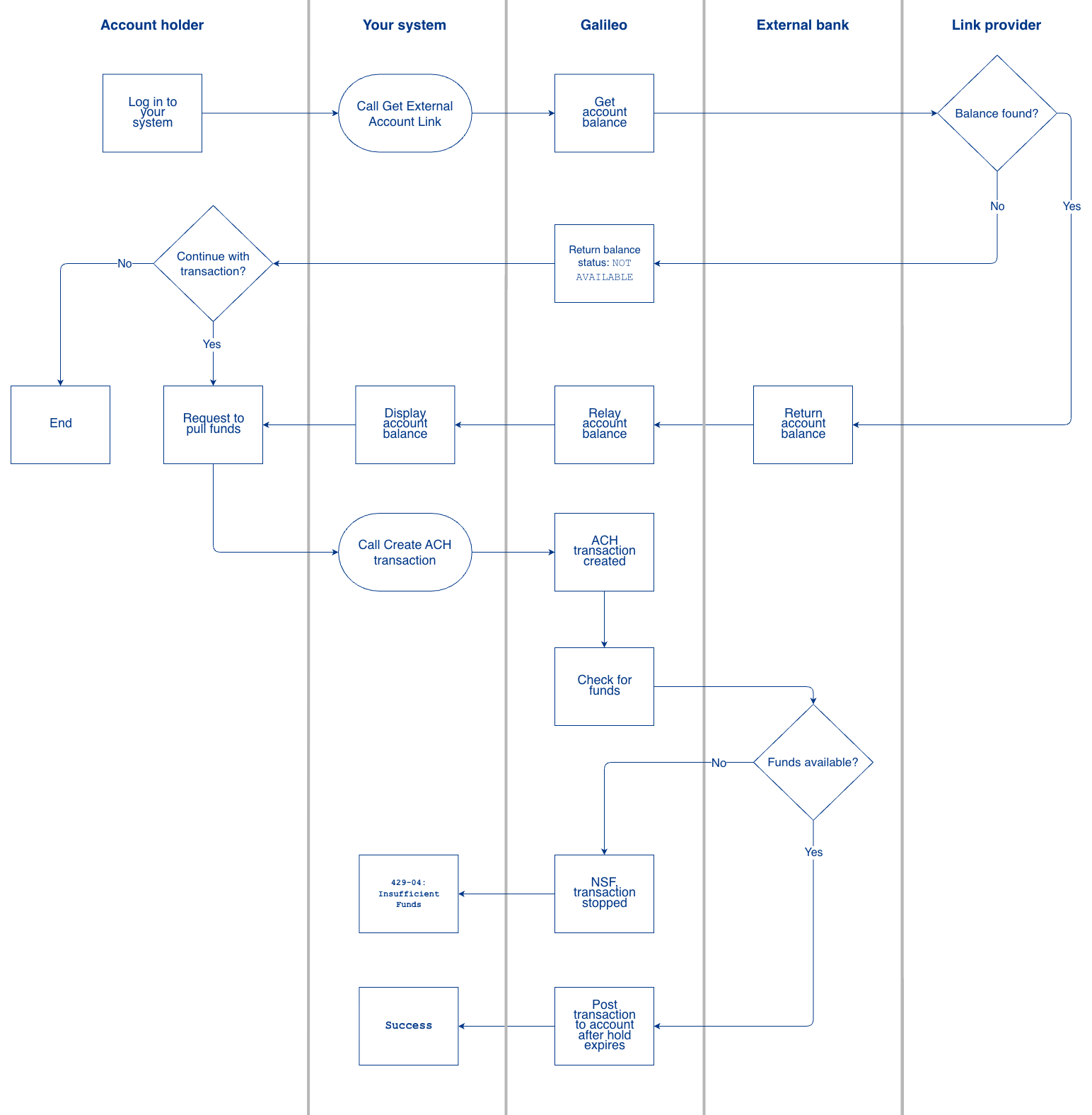
- The account holder logs in to your system and requests to check their balance.
- You call the Get External Account Link endpoint with these parameters:
accountNo— PRN of the account in your program.externalAccountLinkId— The link identifier as returned by Create External Account Link or List External Account Links.includeBalance— Passtrueto retrieve the external account balance.
- Galileo connects to the link provider.
- The link provider checks for the account balance.
- If the link provider is able to retrieve the current account balance from the external bank:
- The external bank returns the account's current balance.
- Galileo relays the account balance to you in the Get External Account Link response.
- You display the account balance to the account holder.
- If the account balance is not available:
- Galileo returns a
NOT AVAILABLEstatus via HTTP. - The account holder chooses whether to continue the transaction despite being unable to check their balance first. The rest of these steps assume the account holder chooses to continue with the transaction.
- Galileo returns a
- If the link provider is able to retrieve the current account balance from the external bank:
- The account holder requests to pull funds from the external account.
- You call the Create ACH Transaction endpoint with these values:
accountNo— PRN of the account on your platform.achAccountId— TheexternalAccountLinkIdas returned by Load External Account Links.debitCreditIndicator—DprocessorToken— Do not pass this key at all, not even with a null value.- All other fields — Refer to individual field guidance in Create ACH Transaction.
- Galileo creates an ACH transaction.
- Galileo queries the link provider to check that the external bank account contains sufficient funds.
- If the funds are available in the account, Galileo adds the transaction to the Nacha file.
- If the funds are not available in the account, Galileo stops the transaction due to NSF.
- Galileo sends an HTTP response reflecting whether the transaction succeeded.
Implementation details
As described in the preceding workflow, you enable this feature by passing an optional input parameter in two different API endpoints.
Input parameter
mastercardBalanceCheck— When you call Get External Account Link, set this parameter toYto perform a real-time balance check on the specified external account. If this parameter is not provided or is set toN, no balance check is performed.
Endpoints
- Get External Account Link — Use this endpoint to retrieve external account details, including the available balance if you pass
includeBalance: Y. - Create ACH Transaction — Use this endpoint to create an ACH transaction. If
finicityBalanceCheck: Yis passed, Galileo performs the balance check before processing the transfer. ThefinicityBalanceCheckflag refers to Mastercard Data Connect.
Timeout consideration: When you set finicityBalanceCheck: Y, you must increase the timeout on your API request to at least 25 seconds. The balance check process can take up to 20 seconds, and failing to extend your timeout will result in connection errors.
Status code
If a balance check performed during a Create ACH Transaction call fails due to insufficient funds, the endpoint returns the following status code:
- 429-04 — Insufficient funds for debit transactions.