

Instant Debit Transfers
Availability
Instant Debit Transfers require specific program configuration and network approval. They are not enabled by default. If you are interested in adding this capability, contact Galileo to discuss your program's eligibility and the implementation process.
As consumer expectations for faster payments continue to grow, the ability to move money in real time is essential for modern financial products. Debit cardholders expect immediate ways to fund their accounts and access their money when they need it.
Instant Debit Transfers are specifically designed for debit cardholders to move funds between accounts they own. This feature is not intended to facilitate transfers to or from accounts owned by different individuals.
Use Instant Debit Transfers to provide debit cardholders a fast, secure, and flexible way to move money. This feature leverages the Visa Direct network to process transactions in near real-time to allow your customers to instantly push and pull funds between their Galileo account and an external debit card. Visa® and Mastercard® programs in the U.S. can use this feature.
Two transfer types comprise this feature:
- Account Funding Transaction (AFT): Allows cardholders to pull funds from an external debit card into their card account.
- Original Credit Transaction (OCT): Allows cardholders to push funds from their account to an external debit card.
Note
This product currently supports U.S. domestic transfers only.
Key capabilities
- Real-time fund availability — Funds are typically available within minutes, allowing your customers to use their money immediately.
- Flexible funding options — Enable your customers to move funds using their existing debit card, lowering the barrier to entry for account funding and money movement.
- Reduce PCI compliance scope — If you are not PCI compliant, use Galileo's secure, embeddable Integrating the Card Capture UI to significantly reduce your compliance overhead.
Use cases
Instant account funding
While doing her weekly grocery shopping, Amanda learns about the FreshMart Debit card. She signs up for an account via the app while in the store. To fund her account, she uses the "add funds with another debit card" feature within the app to pull $150 from her primary bank's debit card into her new FreshMart account. The funds are available immediately, and she uses the FreshMart card to pay for her groceries right away.
Instant cashouts
Taylor receives their monthly government disbursement on a Direct Express card and needs to pay a utility bill from a primary checking account. Taylor opens the Direct Express mobile app and uses the "transfer out" feature. This initiates an outgoing transaction to disburse $100 from their Direct Express account to their primary checking account's linked debit card. Taylor receives the funds instantly and pays the utility bill online.
Cardholder experience
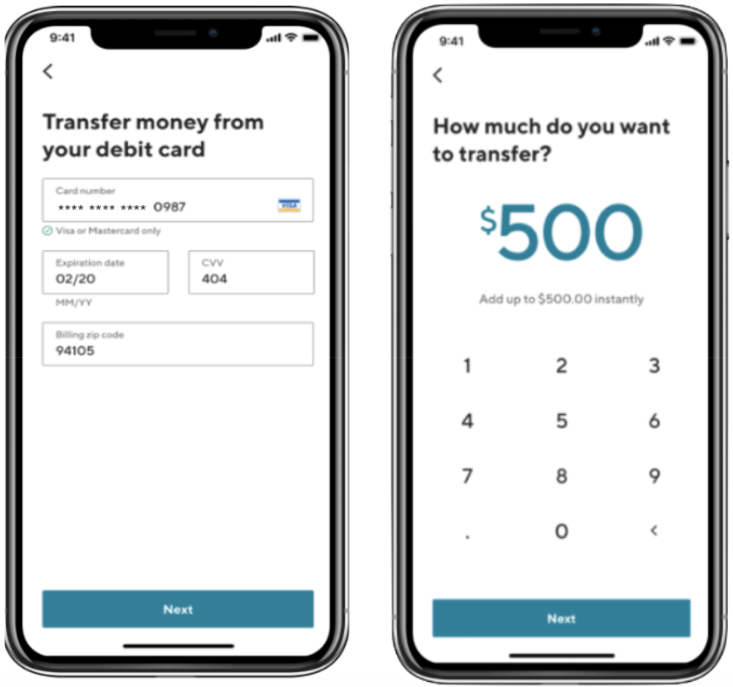
When your debit cardholders move funds using an external debit card, their experience can be as simple as this:
-
The cardholder selects the transfer option within your application.
-
Your interface prompts them to add a new debit card by entering the card number (PAN), expiration date, and security code.
Note: In the background, Galileo performs several security and validation checks, such as CVV and cardholder name verification. This confirms the customer owns the external debit card before linking it to their account with you. -
The debit cardholder enters the amount they wish to transfer.
-
Your interface displays the transfer details for final confirmation.
-
After the cardholder confirms, the system initiates the transfer and displays a submission confirmation screen. This screen informs the cardholder that the request is in progress and that they will receive an email once the transaction is complete.
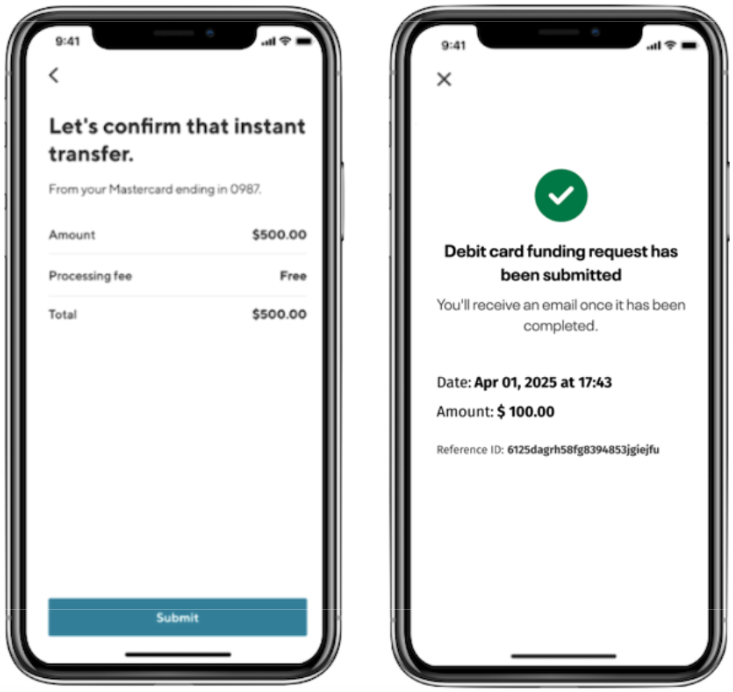
Because the card network and external bank process the transfer asynchronously, Galileo sends the final status 5–10 seconds after the initial submission.
Note: You notify the cardholder of the final transaction status (for example, via email or push notification) based on the event data Galileo returns to your system.
- If successful: Galileo credits or debits the account holder's balance.
- If failed: The account holder's balance does not change.
If a network or bank declines a transfer during the initial Create Transfer request, Galileo returns an error code in real time. Your system should use this data to provide the cardholder with clear instructions on how to resolve the issue.
What Galileo provides
From Galileo, you can expect the following for Instant Debit Transfer programs:
- API endpoints — Endpoints to manage external account links, perform security validations, and initiate movement of funds.
- Card Capture UI — A secure, embeddable option if you are not PCI compliant.
- Events API — Real-time notifications of transaction events and transfer statuses.
- Transaction data files — Files for reporting and reconciliation.
- Sponsor bank and card network setup — Galileo manages the relationship with Sunrise bank, the sponsor bank for this product, and the preexisting network integration. You and your bank do not need to perform new integrations.
What you provide
To implement this feature, you are responsible for the following:
- Building the user experience — Your PCI compliance status determines how you capture card information.
a. If you are PCI compliant, build your own custom interface to capture card details and interact directly with the Payment Hub API. This approach gives you full control over the user experience.
b. If you are not PCI compliant, integrate with Card Capture UI. This prevents sensitive data from passing through your systems. - Product configuration — Galileo helps you configure your program in cooperation with sponsor banks during initial setup.
- Notification logic — Determine the methods for providing cardholder notifications (email, SMS, or push). Your system must consume events from the Events API to trigger these notifications.
- Fee management — Determine the fee structure for your cardholders. Your interface must clearly communicate any convenience fees before the cardholder confirms the transfer.
- FBO account liquidity — Your sponsor bank maintains an FBO account at Galileo’s acquiring sponsor bank. Use this account for daily settlement of AFT and OCT transactions.
- This one-time setup process involves the following steps:
a. Registration — Galileo and our sponsor bank submit a program information form (PIF) to the card network. This form details the program's use cases, volume projections, and technical flows.
b. Network approval — The card network reviews and approves the PIF. This typically takes 10 business days.
c. Certification — After approval, the card network sets up merchant-specific identifiers for transfers. Galileo then certifies that these identifiers work in test environments.
d. Go-live — Once certification succeeds, the card network promotes the environment to production and you can schedule a go-live date.
⚠️ Timeline consideration: The sponsor bank and network setup process takes approximately 1–2 months. Factor this timeline into your project plan.
Security and compliance
Galileo manages all PCI-sensitive data and personally identifiable information (PII) according to high security standards.
- Data handling — Galileo encrypts sensitive values, such as U.S. Social Security numbers (SSN), PANs, expiry dates, and CVVs, when we store them in our system.
- Your compliance path — Your organization's Payment Card Industry Data Security Standards PCI-DSS compliance status determines how you receive and handle this data.
- If you are PCI compliant, you can interact with unmasked data directly via the API.
- If you are not PCI compliant, use Galileo's secure, embeddable UI components. These tools mask sensitive data or replace it with spaces to keep sensitive data from passing through your systems to significantly reduce your compliance scope and burden.
Contact Galileo to discuss the specific compliance requirements and data-handling model for your program.
Next steps
To begin integration, ask your development team to review the following resources:
- Setting Up Instant Debit Transfers — Comprehensive technical walkthrough, including an end-to-end flow, error codes, and setup fundamentals.
- Payment Hub API Reference — Complete list of all required and relevant endpoints.
- Integrating the Card Capture UI — Embed Galileo's optional secure card collection components into your interface.