

Setup for Push Provisioning
This guide describes developer implementation for in-app and web push provisioning. This procedure is not valid for instant-issue cards, which must use manual provisioning. For general information, see Mobile wallet support in Choose a Card Strategy.
Important
Before you start this procedure, you must set up manual provisioning and be live in Production.
Contact wallet providers
For both in-app and web provisioning, you must integrate with the mobile wallet provider’s SDK to allow your users to provision cards and credentials directly to their devices.
To get started, contact the wallet providers to request access to their developer portals and obtain the relevant wallet interface documentation:
- Apple Pay — Send an email to [email protected].
- Google Pay — Consult the Push Provisioning APIs & Issuer Console page.
- Alternatively, you can visit the Google Pay developer portal.
- Samsung Pay — Go to the Samsung Pay developer portal.
Once access has been granted, your developers can also reach out to the wallet provider with any inquiries.
Push-provisioning methods
Select a push-provisioning method:
In-app provisioning
With in-app provisioning, the cardholder requests that a card in your program be added to a mobile wallet using a control in your mobile app.
For integrations with Apple Pay, you can watch an In-App Provisioning demo on the Apple site.
In-app provisioning workflow
The in-app provisioning process involves these entities:
- The cardholder's mobile wallet
- The card network
- The mobile wallet provider
- Your mobile app interface
- Galileo (and you, if you are using the Auth API)
This is the workflow when you push-provision cards to mobile wallets from your app:
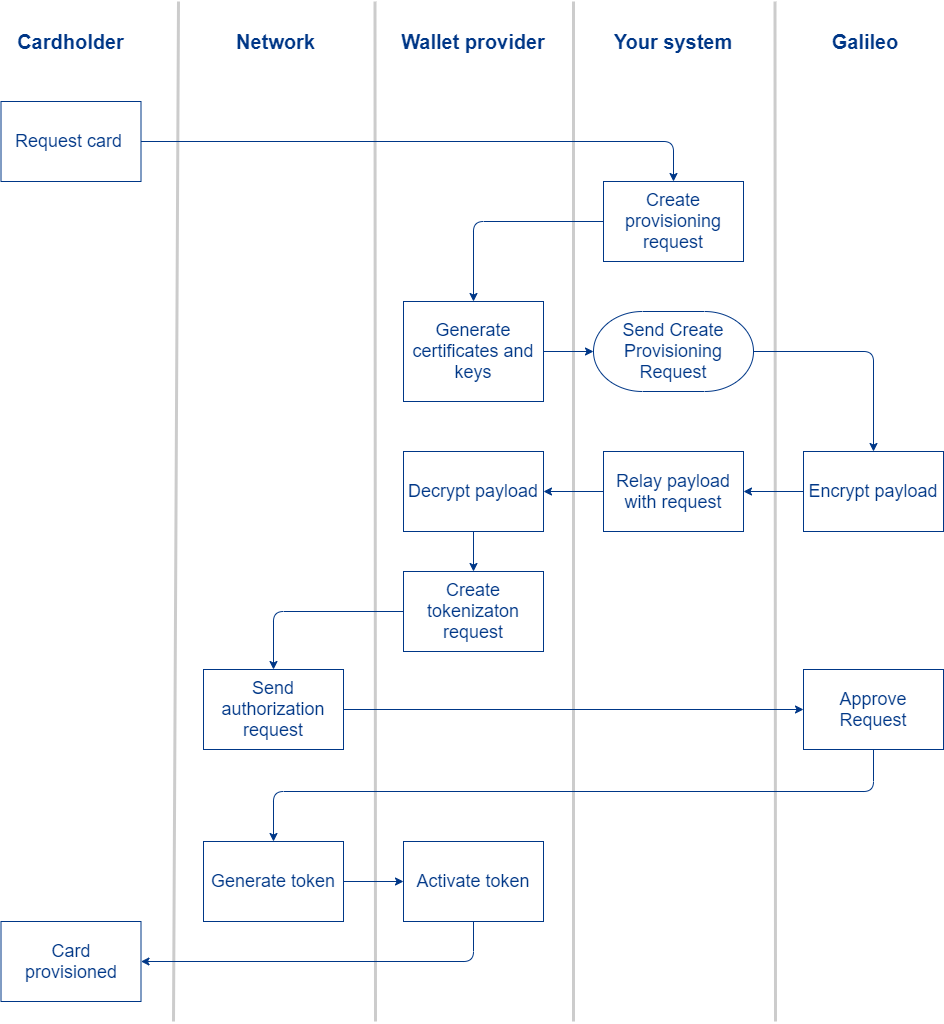
- The cardholder requests a tokenized card in your mobile app.
- You send a provisioning request to the mobile wallet provider.
- The wallet provider returns certificates, keys, and other data.
- You send a Create Provisioning Request call to Galileo with the data supplied by the wallet provider. Follow the instructions in the Creating a Provisioning Request guide.
- Galileo encrypts the payload and returns the response to you.
- You create a tokenization request with the encrypted payload and send it to the wallet provider via its SDK.
- The wallet provider decrypts the payload and verifies whether the tokenization request is valid.
- Because the cardholder's identity has already been verified in your app, there are no red, yellow, or green-path checks. All provisioning attempts are by-definition on the green path.
- The card network creates the card token and sends it to the wallet provider.
- The wallet provider activates the token to provision the card to the wallet.
Web provisioning
You should have already contacted the wallet providers as an initial step. When doing web provisioning, you must perform additional steps for Apple Pay:
- Contact Apple at [email protected] to request access to the Apple Business Register.
- It generally takes 7–10 business days for Apple to review and approve the request. This is a one-time registration.
- Once enrolled, you’ll gain access to detailed implementation guides and API reference documentation for your integration with Apple Pay.
Web provisioning workflow
The web push-provisioning process involves these entities:
- The cardholder's mobile wallet
- The card network
- The mobile wallet provider
- Your website
- Galileo (and you, if you are using the Auth API)
Web provisioning follows the same general workflow as in-app, with the expectation that Galileo is responsible for the certificate validation and encryption during card provisioning.